
This article explains how to invite, manage, and assign units to owners and members in WEGly.
How it works
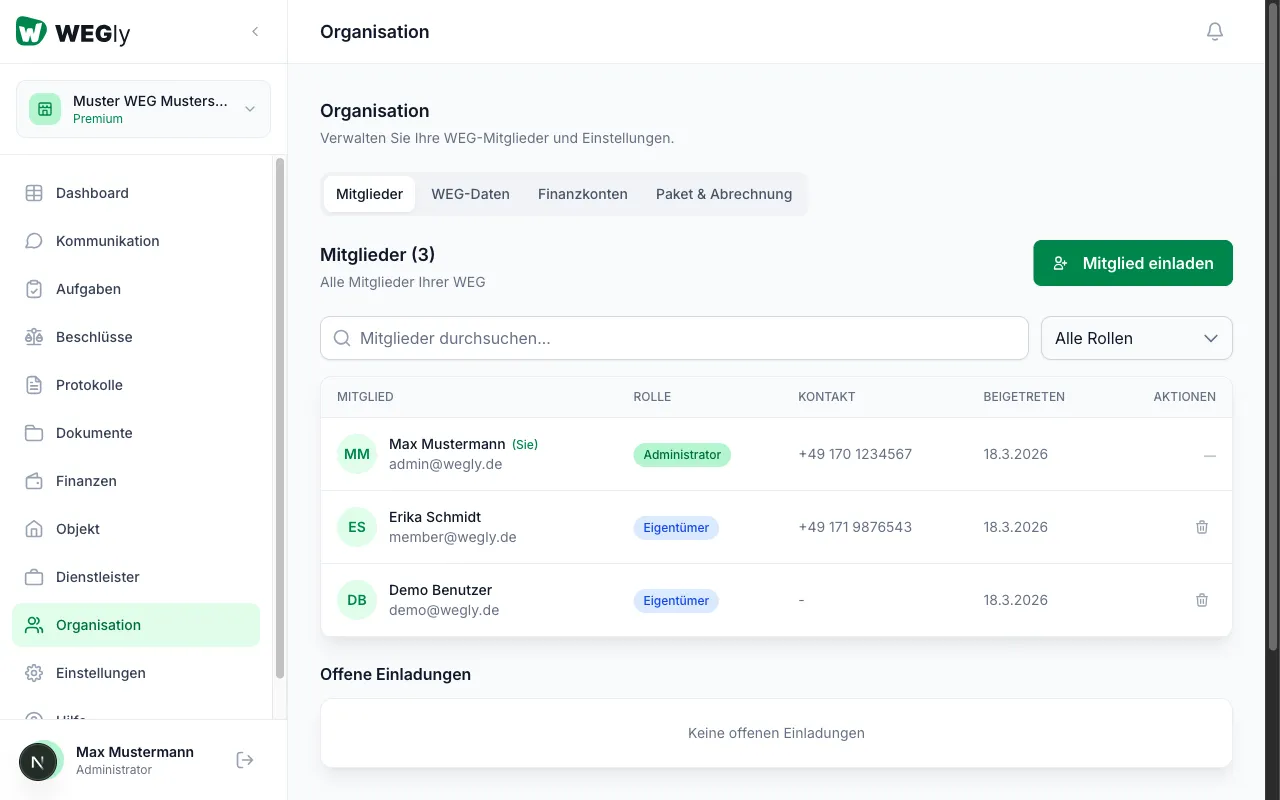
Navigate to Organization in the sidebar. Click the Members tab if it is not already active.
Members overview
The table shows all members with:
- Name and email address
- Role (Administrator, Advisory board, Owner, Tenant)
- Phone number (optional)
- Date joined
Inviting a new member
- Click Invite member.
- Enter the email address.
- Select a role:
- Administrator: Full management rights
- Advisory board: Extended rights (e.g. managing tasks)
- Owner: Standard rights for unit owners
- Tenant: Restricted read access
- Click Send invitation.
The person will receive an email with an invitation link. Pending invitations appear under Pending invitations.
Filtering members by role
Use the All roles dropdown above the table to filter members by role.
Searching for a member
Enter a name in the Search members field.
Removing a member
Click Remove member in the member's row. The member immediately loses access to all HOA data.
Assigning a member to a unit
Units are not assigned directly under Organization but under Property. There, click Owner next to a unit and select the member.
Tips
- Invite owners with the Owner role. They can read all content but cannot make changes.
- Advisory board members receive the Advisory board role. They have more rights than regular owners.
- When an owner leaves the HOA (e.g. after selling their unit), remove the member and invite the new owner.
Frequently asked questions
What happens to tasks and votes when a member is removed? Tasks are retained but are no longer assigned. Vote results remain intact. However, the member loses access.
Can a member change their own role? No. Roles can only be changed by administrators. For more details, see Assigning roles and permissions.