This article explains how to configure email notifications in WEGly in detail. You can set the frequency and individually enable or disable specific notification types.
How it works
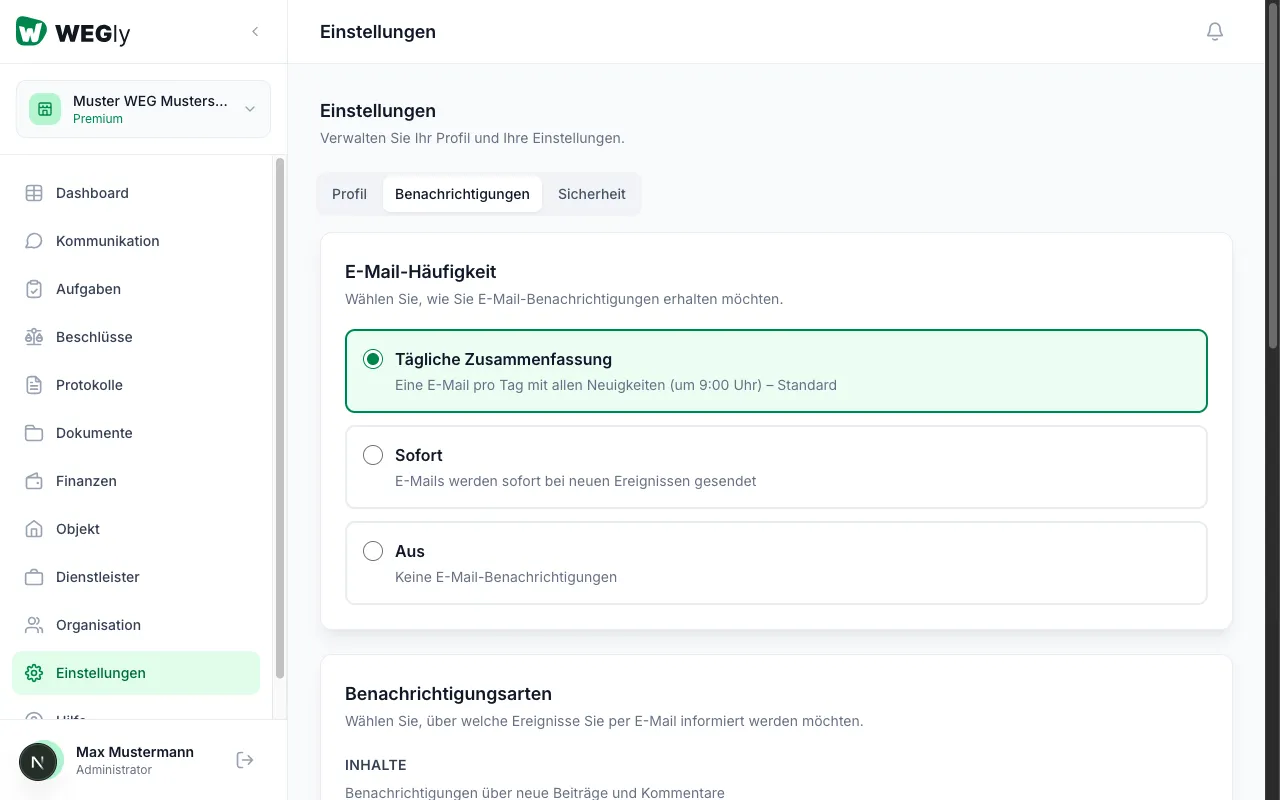
Opening notification settings
- Navigate to Settings in the sidebar.
- Click on the Notifications tab.
Setting email frequency
At the top of the page, under Email frequency, choose how often WEGly informs you by email. There are 3 options:
- Daily digest: You receive one email per day with all news (at 9:00 AM). This is the default setting and recommended for most members.
- Instant: You receive an email immediately when a new event occurs. Recommended for administrators and board members who need to respond quickly.
- Off: You receive no email notifications. All news is only visible on the dashboard when you next log in.
Click on the desired option. The change is saved immediately.
Controlling individual notification types
Under Notification types, you control which events inform you by email. Each type has its own switch (on/off). The types are divided into 6 groups:
CONTENT (posts and comments)
- New post: When a new post appears on the notice board
- New comment: For comments on posts
- Post pinned: When a post is pinned
- Document uploaded: For new documents
TASKS (tasks and deadlines)
- Task assigned: When a task is assigned to you
- Task due: Shortly before a task deadline
VOTES (online votes)
- Vote started: For new votes
- Vote ended: When a vote is completed
FINANCES (ledger entries)
- Ledger entry: For new bookings in the ledger
MEMBERS (new members)
- New member: When a new member joins the HOA
MEETINGS (minutes and resolutions)
- Minutes published: For newly published minutes
- New resolution: When a new resolution is recorded
Using the switches
Click on the switch next to a notification type to enable (green) or disable (gray) it. Changes are saved automatically.
Recommended configuration by role
For owners: Enable Vote started, Task assigned, and Minutes published. You can disable the rest as needed.
For board members: Keep all notifications enabled. As a board member you should be informed about all HOA activities. Choose the Instant frequency for tasks and votes.
For administrators: Enable all notifications with Instant frequency. This allows you to respond quickly to new posts, tasks, and votes.
Tips
- Start with the Daily digest. If you miss important events, switch to Instant for the relevant categories.
- Disable New comment if you receive many comment notifications and find them disruptive.
- Emails are sent to the address you registered with. Check this under Settings, tab Profile.
Frequently asked questions
Can I set notifications differently per HOA? The settings currently apply to all HOAs you are a member of. Individual configuration per HOA is planned for a future version.
Why am I not receiving emails despite having notifications enabled? Check your spam folder. Add noreply@wegly.de to your trusted senders. If the problem persists, contact support@wegly.de.
Are notifications also sent as push messages? WEGly currently only sends notifications by email. Push notifications are planned for a future version of the mobile app.